Find your largest photos
Scan the photos you allow, switch between All Photos and Largest First, or open a format category. Prefer to choose a few? Import from Photos or Files.
 PhotoLiteby Kiamco Tech
A little less space for every photo. Scan your library, find the biggest files, and compress, convert or resize with a few simple taps.
iOS 18 or later · No PhotoLite account required
 Compare. Save. Keep control.
Scan the photos you allow, switch between All Photos and Largest First, or open a format category. Prefer to choose a few? Import from Photos or Files.
Choose a quality preset, convert between JPEG, HEIC and PNG, or resize while keeping the original proportions. Process one photo or a batch.
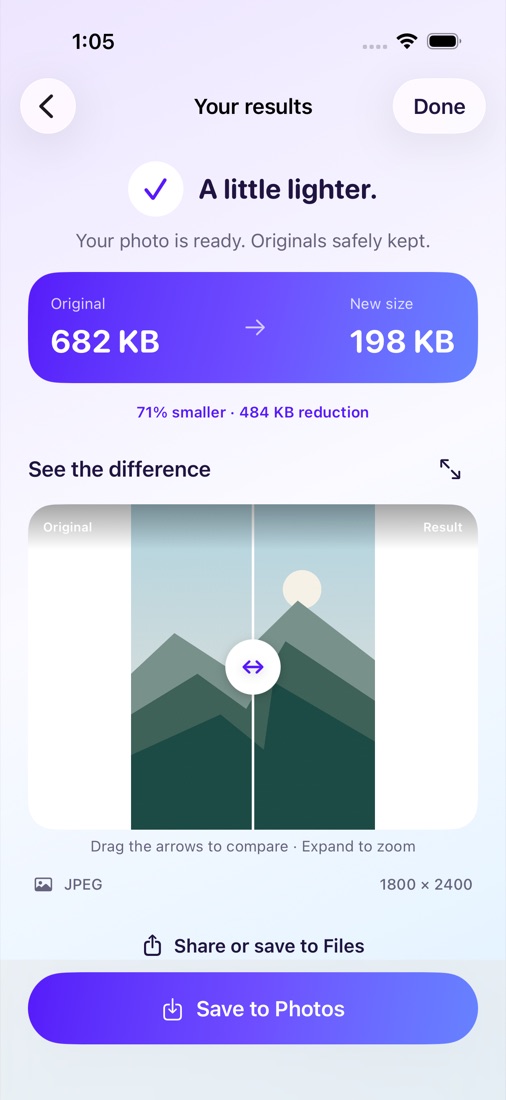
Drag across the original and result to compare, expand to zoom, and check the actual file sizes. Save a new copy to Photos, share it, or save to Files.
Image processing stays on your device. Originals are never deleted automatically. Manage app storage, or review eligible originals after saving and choose what to remove.
Savings vary. Conversion can produce a larger file, and compression can change fine detail. Saving a copy uses additional space; the size difference is not space automatically reclaimed.
Unlimited scanning and previews, plus five successful photo exports each day. Each photo in a batch counts once. Failed exports don’t count. Save and share existing results as often as you like.
$4.99 / year (U.S.)
Unlimited photo processing and batches while Pro is active.
Optional annual subscription. Renews automatically until cancelled. Apple displays the applicable local price before purchase.
Subscription details →Questions about formats, saving copies, clearing app storage or restoring Pro?
Have videos to compress too? Meet ClipLite.